

Download ICUII Video Chat – Free, Secure Video Conferencing for Windows
Looking for a reliable, lightweight video chat solution for connecting with friends and family? ICUII Video Chat is a trusted communication tool that brings real-time video and audio conversations to your desktop. Designed specifically for Windows users, this free software offers seamless one-on-one and group video chats, making it ideal for personal use and small group interactions. With features like imposter protection, panic button, multiple monitor support, and auto-updates, ICUII ensures a smooth and secure experience. Despite being released in 2007, it remains a solid choice for users who value simplicity, low system requirements, and privacy. Whether you're on a home network or behind a firewall, ICUII delivers stable performance with improved network compatibility. Download ICUII Video Chat today and enjoy free, high-quality video calling on Windows — no registration needed, no hidden costs.
Why ICUII Video Chat Stands Out in the World of Instant Messaging
When it comes to instant messaging and video chat software, many modern alternatives come with bloated interfaces, constant ads, and intrusive data collection. ICUII Video Chat offers a refreshing contrast — a lightweight, privacy-focused tool that prioritizes user experience over complexity. Released in 2007 and updated on July 5th of that year, ICUII has stood the test of time, earning over 31,000 downloads since its debut. Its enduring popularity, especially in countries like Turkey, Canada, and the United States, speaks volumes about its reliability and ease of use.
One of the key reasons ICUII remains relevant is its minimal system footprint. Unlike modern video conferencing apps that demand high RAM and CPU usage, ICUII runs efficiently on older hardware, including systems with Windows 98 or later. This makes it a great option for users who still rely on legacy machines or want to avoid the resource drain of newer apps. The software supports DirectX, enabling compatibility with a wide range of webcams and ensuring smooth video capture even on low-end devices.
Another standout feature is the Imposter Stopper, a security tool that disables software-based virtual cameras, helping prevent identity theft and fake profiles during video calls. This is especially valuable in an era where online impersonation is common. Additionally, the Panic Button allows users to instantly minimize the app with a single keystroke — perfect for discreetly hiding your chat during unexpected interruptions. Whether you're in a shared workspace or a family environment, this feature adds a layer of privacy and control.
Powerful Features That Make ICUII a Smart Choice for Personal Communication
ICUII Video Chat isn’t just about video calls — it’s a fully-featured communication suite designed to keep your social connections active and organized. The Integrated Pal List and QM Backup system ensures you never lose your contacts, even if your system crashes. You can back up your entire friend list with just a few clicks, making it easy to restore your network when switching devices or reinstalling the OS.
The Quick Messaging System allows you to send instant text messages without opening a full chat window. This is ideal for quick check-ins, sharing links, or sending a quick “Hey, how are you?” while keeping your screen clutter-free. The Message Center acts as a centralized hub for all incoming and outgoing messages, ensuring you never miss an important update.
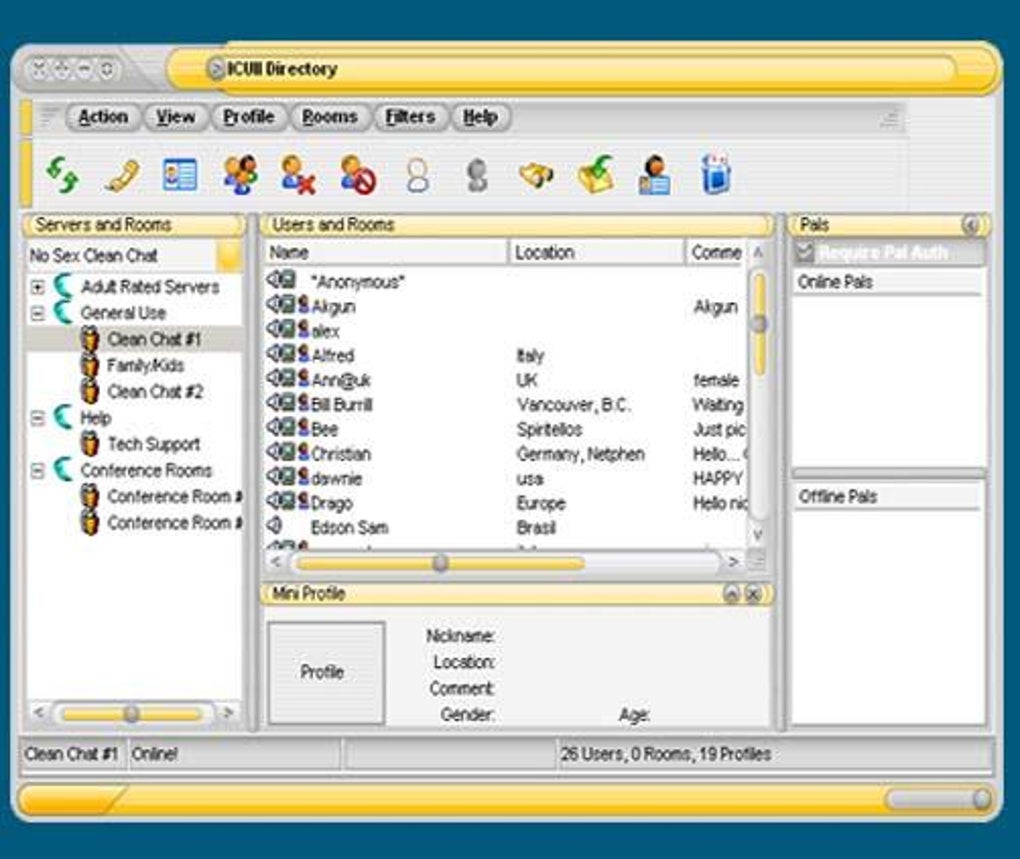
For users with dual monitors, Multiple Monitor Support is a game-changer. You can place the video window on one screen and your chat or documents on the other, maximizing productivity and comfort during long conversations. The User Directory with invisibility option lets you browse other users without revealing your presence — perfect for those who want to explore connections without being seen.
ICUII also supports offline quick messaging, so you can send messages even when your contacts are not online. These messages are delivered the moment they come back online, ensuring no communication gaps. The software includes both G-Rated and Adult Areas, catering to different user preferences while maintaining a structured environment. With auto-updates built directly into the app, you’ll always have the latest version with bug fixes and performance improvements.
How to Install and Use ICUII Video Chat on Windows
Installing ICUII Video Chat is a straightforward process, especially for users familiar with older Windows systems. First, download the setup file from a trusted source — make sure to verify the file’s integrity before running it. The installer is lightweight and typically under 10MB, which is significantly smaller than most modern communication apps.
Once downloaded, run the installer and follow the on-screen prompts. The setup wizard will guide you through the process, asking you to choose an installation directory and create a shortcut on your desktop. No additional software or drivers are required — ICUII is self-contained and ready to use after installation.
After installation, launch the app. You’ll be prompted to sign in with your ICQ account or create a new one. If you’re using an older system, ensure your firewall or router settings allow ICUII to access the internet. The software includes improved network support, so it works well even behind NAT routers and firewalls.
To start a video call, simply select a contact from your Pal List, click the video icon, and wait for the connection to establish. You can also initiate group video chats with multiple friends at once. Use the Panic Button (default key: Ctrl+Shift+M) to minimize the window instantly. For privacy, use the Invisibility Option when browsing the User Directory.
For advanced users, ICUII supports DirectX integration, which enhances video quality and camera compatibility. Make sure your webcam drivers are up to date for optimal performance. The app also features a built-in backup system — go to Settings > Backup to save your Pal List and message history.
Compatibility, Pros, and Cons: A Balanced View
ICUII Video Chat is designed for Windows operating systems, including Windows 98 and later versions. While it doesn’t support Mac, Android, or iOS, it remains a solid choice for Windows users who value stability and low resource usage. The software is available in English only, which may limit accessibility for non-English speakers.
- Pros:
- Lightweight and fast performance on older systems
- Secure features like Imposter Stopper and Panic Button
- Supports dual monitors and multiple video chats
- Auto-updates and built-in backup system
- Free to download and use with no hidden fees
- Cons:
- No support for Mac, iOS, or Android devices
- Outdated interface by modern standards
- Only available in English
- No mobile app for on-the-go access
- Latest update was in 2007 — no recent development
Frequently Asked Questions (FAQ)
Is ICUII Video Chat free to download?
Yes, ICUII Video Chat is completely free to download and use. There are no subscription fees or hidden costs. You can enjoy real-time video and audio calls without paying a dime.
Can I use ICUII on Windows 10 or Windows 11?
While ICUII was originally designed for older Windows versions, it often runs on Windows 10 and 11 with compatibility mode enabled. However, performance may vary. For best results, use it on Windows 7 or earlier.
Does ICUII support group video calls?
Yes, ICUII supports real-time multiple video chats with audio, allowing you to connect with several friends simultaneously. The interface adjusts dynamically to display multiple video feeds.
How do I back up my contact list?
Go to Settings > Backup and select your preferred location. ICUII will save your Pal List and message history, which you can restore later if needed.
Is ICUII secure for private conversations?
Yes, ICUII includes several security features such as the Imposter Stopper, which blocks fake cameras, and the Panic Button for discreetly minimizing the app. However, due to its age, it may not have modern encryption standards.
Final Verdict: Is ICUII Video Chat Worth Downloading?
Despite being over 15 years old, ICUII Video Chat remains a surprisingly capable tool for users who prioritize simplicity, speed, and privacy. Its lightweight design, secure features, and reliable performance make it a solid choice for Windows users on older systems or those who want a no-frills video chat experience. While it lacks modern features like mobile apps and multi-platform support, its core functionality — real-time video calls, instant messaging, and contact backup — is still highly effective.
If you're looking for a free, secure, and easy-to-use video chat software for Windows, ICUII is definitely worth a try. Download it today and reconnect with friends and family without the clutter of modern apps.
Download ICUII Video Chat now and enjoy hassle-free communication on your desktop.







